
How to Sell Web Hosting with WooCommerce? Full Guide & Setup

Author
John CavilThis guide walks you through selling web hosting directly from WooCommerce using Sell Hosting for WooCommerce on Pofii infrastructure.
No external billing systems.
Everything runs inside WooCommerce.
1. Choose a Pofii Reseller Plan
- Pick any Pofii reseller plan
- Go to your Pofii client area
- Navigate to Downloads
- Download the Sell Hosting for WooCommerce plugin (
.zipfile)
2. Install Required Plugins in WordPress
- Go to WordPress Admin → Plugins → Add New
- Click Upload Plugin
- Upload the downloaded
.zip - Install and activate Sell Hosting for WooCommerce
If you don’t already have WooCommerce:
- Install and activate WooCommerce
- Complete the basic WooCommerce setup (currency, checkout, etc.)
3. Create a Hosting Package in pPanel
- Log in to pPanel
- Go to Packages
- Create a new package
Example name:yourusername_test - Set disk, bandwidth, limits, whatever you want
- Save the package
This package name is important. You’ll use it later.
4. Create a Hosting Product in WooCommerce
- Go to WooCommerce → Products → Add New
- Enter:
- Product name
- Description
- Price (one-time or recurring)
- In Product Data:
- Choose Simple product
- Check “Is this Hosting product?” ✅
- Publish the product
This turns the WooCommerce product into a hosting product.
5. Connect WooCommerce to Pofii (Add Server)
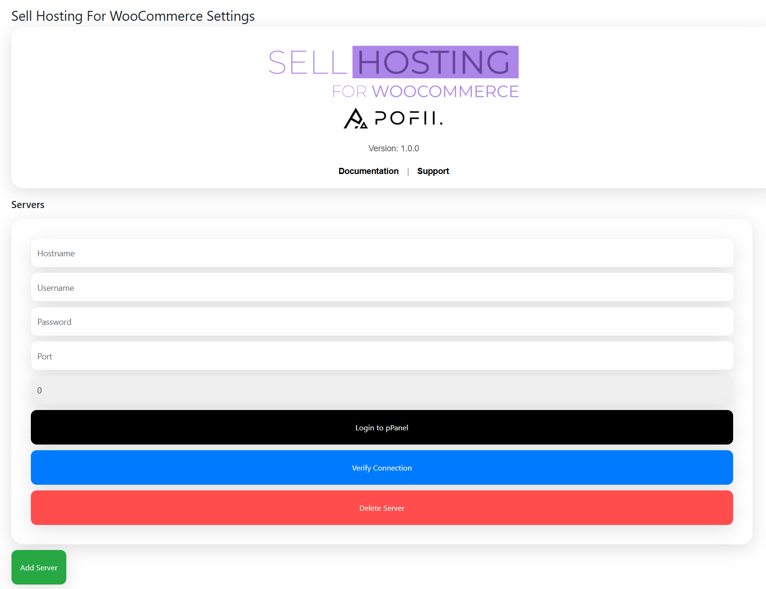
- In WordPress sidebar, go to Sell Hosting
- Click Add Server
- Enter:
- Hostname
- Username
- Password
- Port
Use the exact same credentials from your Pofii client area.
- Save settings
Your WooCommerce store is now connected to Pofii.
6. Map WooCommerce Product to pPanel Package
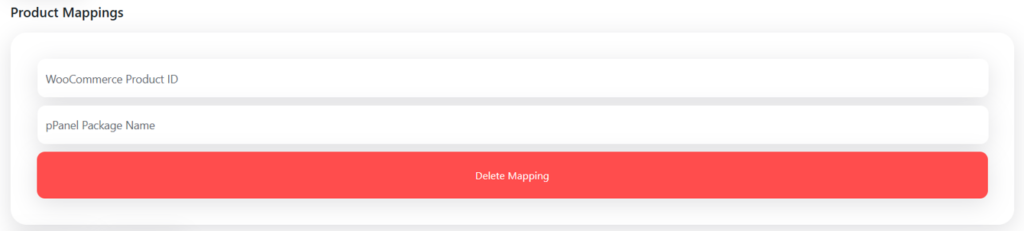
- Go back to Sell Hosting
- Add a product mapping:
- Select the WooCommerce product
- Enter the exact package name from pPanel
(example:yourusername_test)
- Make sure:
- WooCommerce product ID matches
- pPanel package name matches
Save.
7. Checkout & Order Behavior
- The plugin automatically adds a “Domain Name” field at checkout
- Customer completes checkout like a normal WooCommerce product
After payment:
- Hosting account is automatically created
- Website is auto-set up
- Customer credentials appear in the WooCommerce order:
- Username
- Password
- Customer sees “Login to pPanel” button in their order page
- SSO access — no extra logins
8. Order Status Logic (Important)
- Processing / Completed → Hosting is active
- Canceled / Refunded → Hosting is automatically suspended
No manual work.
9. Recurring Billing (Recommended)
If you want monthly or yearly billing:
- Install WooCommerce Subscriptions
- Use it with hosting products
The plugin supports it natively.
10. Scaling
- Unlimited servers
- Unlimited hosting products
- Add more packages anytime
- Add more WooCommerce products anytime
No limits imposed by the plugin.
Done!
You’re now selling web hosting directly from WooCommerce.
Orders provision accounts automatically.
Suspensions happen automatically.
Customers get instant access.
Related Tags:
1 comments
Related Articles
All posts
Tutorials
January 26, 2026
How to fix DNS_PROBE_FINISHED_NXDOMAIN (step by step)
Hosting Tips & Tricks
January 26, 2026
Well done, John! Great tutorial as always.